Python
Record your first voice-agent call from Python and open it in the console — about ten minutes, no agent framework required.
By the end of this page you will have a recorded call sitting in a local dashboard, with audio you can play and a trace you can expand.
Before you start
- Python 3.10 or newer for the SDK
- Python 3.11 or newer for the dashboard
gitand network access to GitHub. The repository is public and supports anonymous Git access; this guide installs from Git. The anonymous PyPI check forvaanieval-observerreturned HTTP404on 20 September 2026; no release was found under that distribution name.
Source installs and hosted beta
The repositories are public and support anonymous Git access. These guides install the SDKs from public Git. Anonymous registry checks on 20 September 2026 returned HTTP 404 for npm @vaanieal/observer and PyPI vaanieval-observer; no release was found under those names. Source availability does not mean the hosted service is ready for public launch: new public workspaces remain closed.
The quickstarts pin published Python 0.5.7b1 and Node 0.1.1-beta.1 source previews. Both installed previews have uploaded synthetic calls to the isolated hosted development environment. Git/build tooling and explicit revision upgrades are required; this is not registry publication or production-readiness certification.
For setup help, email shubham@vaanieval.com or book a call — a short conversation about your use case tells us whether Vaanieval fits, and helps identify the setup that matches your stack.
For an admitted hosted workspace, use the same pinned SDK below and the
three-step setup at beta.vaanieval.com. You do not
need to run the local dashboard. Public workspace admissions remain closed.
This is a source preview (0.5.7b1), not a PyPI release; Git and Python build
tooling are required, and upgrades are explicit.
Nothing here requires LiveKit, OpenAI, or any particular provider. If you are on LiveKit Agents, do this page first anyway — then swap in the LiveKit integration, which wires all of it up for you.
1. Run the dashboard
Clone and install
git clone https://github.com/shubhamofbce/vaanieval-observer-backend.git dashboard
cd dashboard
python3 -m venv .venv
source .venv/bin/activate
pip install -r requirements.txt
Start it
uvicorn app.main:app --host 127.0.0.1 --reload --port 8000The console is served at http://localhost:8000/. It will be empty — you have
not recorded anything yet.
Out of the box the local dashboard accepts any non-empty API key without
checking it, and has no tenant isolation. That is deliberate for a developer
loop; set VAANI_REQUIRE_API_KEY=1 to make ingest require a real key. Read
endpoints stay open either way. Keep this local app on localhost; a key does
not make it tenant-safe. Hosted beta uses a separate entrypoint and is under
construction. See Self-hosting.
2. Install the SDK
pip install "git+https://github.com/shubhamofbce/vaanieval-observer-python-sdk.git@0797c0fcdac6039f8830e6c726e0e593d36cf646"The SDK has no required runtime dependencies. Install the extra that matches the HTTP client your agent already uses, so provider calls are instrumented automatically:
pip install "vaanieval-observer[httpx] @ git+https://github.com/shubhamofbce/vaanieval-observer-python-sdk.git@0797c0fcdac6039f8830e6c726e0e593d36cf646"3. Record a call
This script records one synthetic call: two turns, a transcription span, a model span, and audio on both channels. Run it against the dashboard you just started.
import asyncio
import math
import struct

from vaani_observer import VaaniObserver

SAMPLE_RATE = 16000
FORMAT = {"encoding": "pcm_s16le", "sample_rate_hz": SAMPLE_RATE, "channels": 1}


def tone(hz: int, ms: int) -> bytes:
    """A second of audible PCM, so the recording has something to play."""
    frames = int(SAMPLE_RATE * ms / 1000)
    return b"".join(
        struct.pack("<h", int(9000 * math.sin(2 * math.pi * hz * n / SAMPLE_RATE)))
        for n in range(frames)
    )


async def main() -> None:
    vaani = VaaniObserver(
        endpoint="http://localhost:8000",
        api_key="local-dev",              # the local dashboard does not validate this
        spool_directory="./.vaani-spool",
        endpoints=[
            {"id": "llm", "type": "llm", "url": "https://api.openai.com/v1"},
        ],
    )

    session = vaani.start_session(agent_id="quickstart-agent")

    for index in range(2):
        turn = session.start_turn()

        # The caller speaks.
        stt = session.start_operation(type="stt", turn_id=turn.id, provider="demo")
        stt.event("speech_started")
        session.record_inbound_audio(tone(220, 900), FORMAT)
        await asyncio.sleep(0.9)
        stt.event("final_transcript")
        stt.end(status="ok", response={"transcript": f"caller line {index + 1}"})

        # The model thinks.
        llm = session.start_operation(
            type="llm", turn_id=turn.id, provider="demo", model="demo-model"
        )
        await asyncio.sleep(0.4)
        llm.event("first_token")
        llm.end(status="ok", response={"tokens": 128})

        # The agent speaks.
        tts = session.start_operation(type="tts", turn_id=turn.id, provider="demo")
        tts.event("first_byte")
        session.record_outbound_audio(tone(440, 1200), FORMAT)
        tts.end(status="ok")

        turn.end()

    finalized = await session.end(outcome="completed")
    print("package written to", finalized.directory)

    await vaani.upload_package(finalized)
    print("uploaded session", finalized.session_id)


asyncio.run(main())
python record_a_call.pyYou should see something like:
package written to ./.vaani-spool/6f1c...-...
uploaded session 6f1c...-...
4. Open the call
Refresh http://localhost:8000/. Your call is in the rail on the left. Click it
and you get the waveform, the turn markers, and a trace you can expand down to
individual milestones.
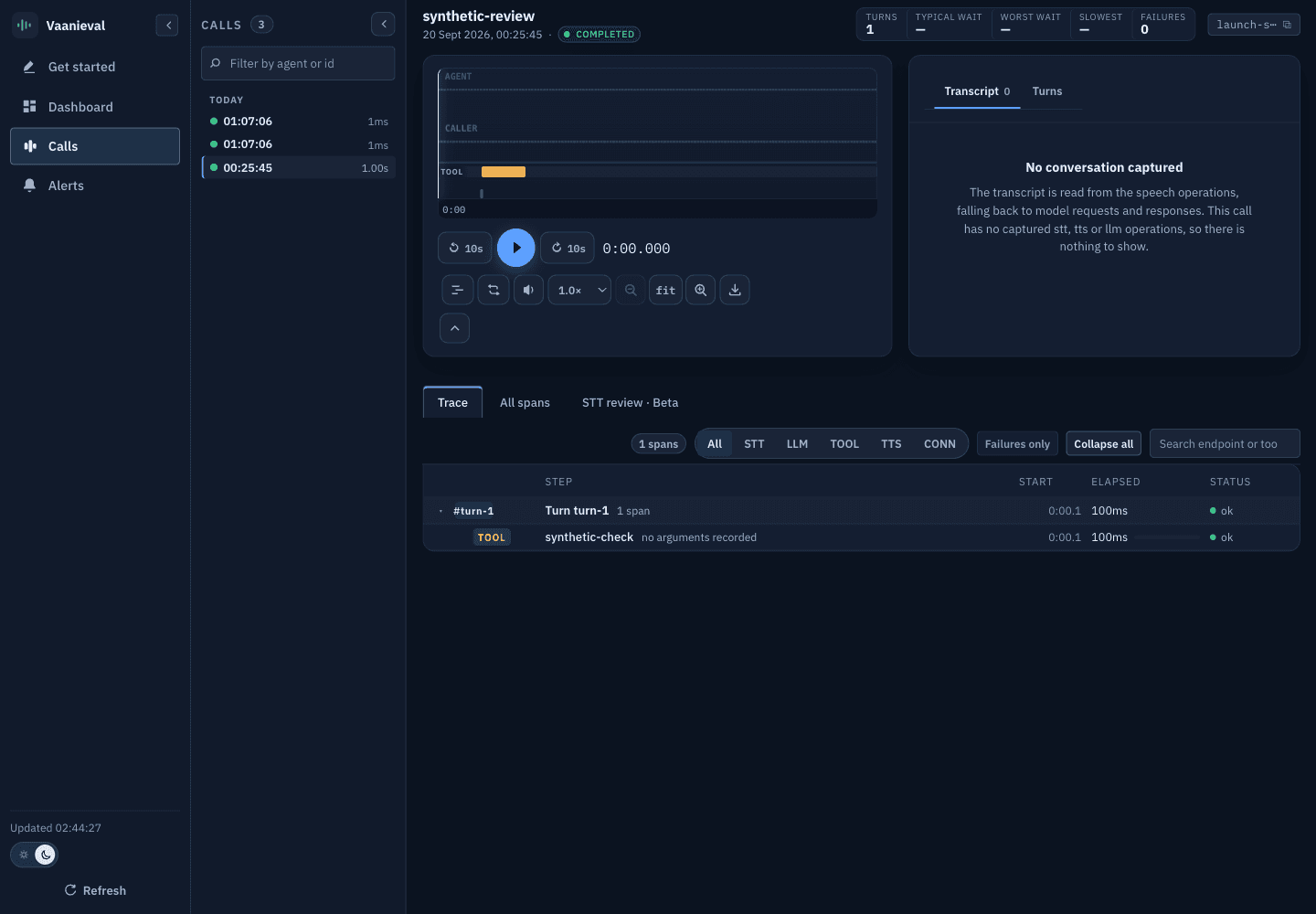
The documentation screenshot is a separate synthetic, tool-only fixture, not the two-turn script above or a hosted customer call.
Look at the spool directory too — .vaani-spool/<session-id>/ contains
manifest.json, events.jsonl and call.audio. These contain the captured
evidence; optional evaluation adds external model outputs. See
Session package.
What just happened
VaaniObserver was configured, not connected
Constructing the observer installs HTTP and websocket instrumentation in-process
and validates your endpoint rules. It does not open a connection to the
dashboard. endpoint and api_key are only used by upload_package().
The session spooled to disk as the call ran
Every event and audio chunk was appended to ./.vaani-spool/<session-id>/ by a
dedicated writer thread, so no filesystem syscall ran on the event loop. Audio
arrives every 20 ms in a real agent, and a blocking write there is audible.
end() finalized the package
It closed open spans, flushed the writer, composed the two mono tracks into one
timeline-aligned stereo call.audio (agent left, caller right), and wrote
manifest.json last — via a temp file and rename, so a reader never sees a
half-written manifest.
upload_package() shipped it, after the call
Three steps: POST /v1/sessions with the manifest, PUT each object to the URL
the dashboard returned, then POST .../complete with byte sizes and SHA-256
digests. Upload is always explicit and always post-call — the library never
uploads on the live media path.
Wire it into a real agent
The synthetic script called start_operation() by hand. In a real agent you will
usually want two things instead:
- Automatic HTTP capture. Any
httpxoraiohttprequest made insidewith session.context():whose URL matches one of your configuredendpointsis timed and recorded for you, with no code change at the call site. - Turn grouping. Wrap the work for one caller utterance in
with session.with_turn(turn.id):so auto-instrumented calls land on the right turn.
session = vaani.start_session(agent_id="support")
turn = session.start_turn()

with session.with_turn(turn.id):
    # Instrumented automatically because api.openai.com matches an endpoint rule.
    response = await client.chat.completions.create(...)
Read Recording a call next, or go straight to LiveKit Agents if that is your framework.
Troubleshooting
upload_package() needs both endpoint and api_key on the observer. If you
only want local spooling, do not call it — session.end() alone writes a
complete, valid package to disk.
POST /complete marks a session ready only when it imported at least one
operation from events.jsonl; otherwise the status is partial. A partial
session is still browsable. The usual cause is a session that ended before any
start_operation() call, or operations that were never end()ed — an operation
is written to events.jsonl when it ends, not when it starts.
Audio capture requires pcm_s16le input with an integer sample_rate_hz and
channels; anything else raises a ValueError rather than recording silently
(a non-bytes chunk raises TypeError). The format also cannot change within a
session. Check that capture.audio was not set to False — record_*_audio()
returns False instead of raising when capture is disabled or the session has
already ended.
Auto-instrumentation is inert unless there is an ambient session and the URL
matches a configured endpoint rule. Confirm the call is inside
with session.context(): and that your endpoints list has a rule whose url
is a prefix of the request URL. See
Endpoints and instrumentation.
Introduction
Vaanieval captures enabled audio, transcripts, provider spans and timing evidence in local session packages for post-call review and optional model-disagreement analysis.
Node.js
Record your first voice-agent call from Node.js, with automatic fetch instrumentation and websocket accounting.